
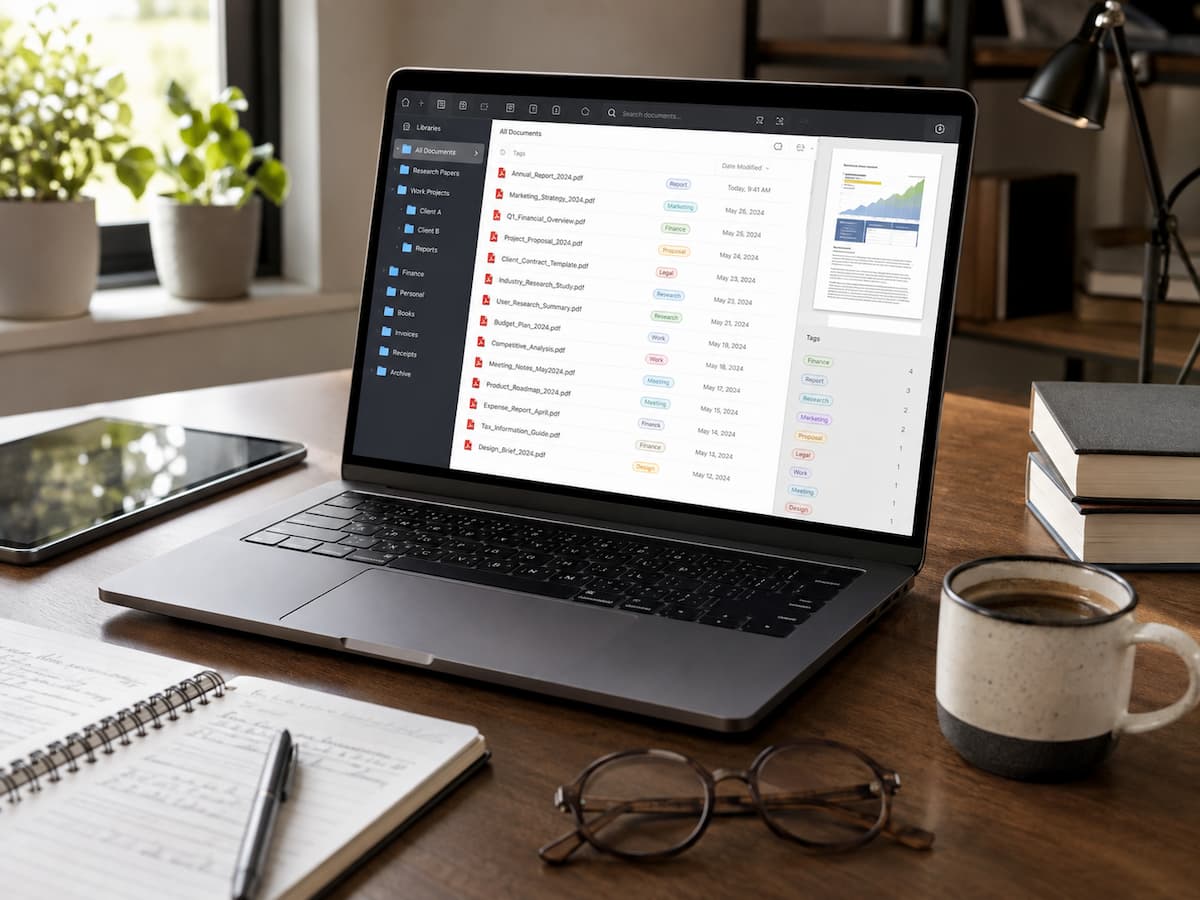
Your PDF Library Is Really a Personal Knowledge Archive
PDF files look a lot like ordinary files on a computer; they are easy to understand. Folder icons sit next to spreadsheets, photos, and presentations. However, PDFs often contain something very different. They can contain instructions you might still need years later, contracts you might unexpectedly need, textbooks for exam preparation, travel confirmations, tax documents, cookbooks, technical manuals, and countless other valuable pieces of information. It is precisely this subtle difference that requires a different management approach. You can usually find lost photos because you remember them. But PDFs are different. Their value often lies in the information you only recall when you need it. That is why easy access is more important than neatness and order.
Think of people who enjoy learning online. Over the years, they have downloaded computer courses, photography manuals, woodworking drawings, gardening books, financial education materials, and repair manuals. All these documents provided knowledge, but they largely disconnected from each other. If you were to treat these documents as mere ‘files,’ you would end up creating endless folders. However, by viewing them as a personal reference library, you create a more organized structure, making future learning easier.
Libraries offer a wealth of fascinating knowledge. Libraries need tidy bookshelves, so librarians don’t just organize books; they organize them so that readers can still locate the information they need decades later. A personal PDF document library is much smaller than a public library, but the same principle applies. Even if you have forgotten when you downloaded it, every document must be searchable. This way of thinking often simplifies the system. Instead of asking, “Where should I save this PDF?” it is better to ask, “Where can I easily find this information again in six months?” ” The answer is usually much simpler.
The Hidden Costs of Storing Everything Without Planning
Thanks to cheap digital storage, it is rarely necessary to delete files. Because PDFs can be valuable, many people keep almost every PDF they find. Documents are fine, but unstructured collections become unreliable. Imagine you are looking for a tax form from three years ago. Your search results show six nearly identical PDFs with similar titles, multiple copies downloaded on different dates, and a scanned version you had forgotten existed. You have to open every file to check if it is correct. This is not a lack of storage space; this is a shortage of storage space. Your collection no longer communicates with one another.
This problem manifests itself in various ways. Manuals and invoices remain messy. Research papers share temporary download folders. Conference notes lie next to legal documents because they were downloaded on the same day. Categories lose their relevance over time because they were never designed for long-term use. Another consequence is often overlooked. When people lose trust in libraries, they download the same information again. Searching the internet again is faster than browsing through folders. Collections grow, but older documents become invisible, making them less useful. Recognizing this trend does not mean you are pursuing minimalism. It is about understanding that every new PDF must enrich your library or serve a specific, temporary purpose. Useless documents unknowingly cause friction when you need something important.
Browse Before Search
Many people rarely browse the internet these days because search fields are so effective. Type in a term and the right document should appear immediately. Searching is useful, but relying on it entirely can be limiting, especially if you forget the title or term. Think of a cookbook you have had for a long time. You might remember a recipe from the middle of the book, next to another recipe you liked. The name is forgotten, but by browsing you can find it quickly because the layout is familiar. Digital documents work in a similar way.
A well-organized PDF collection makes browsing just as valuable as searching. Broad categories create recognizable areas of information instead of cramming hundreds of loose files into one large folder. Personal financial records are grouped together. Medical records form a separate category. Product manuals stand separately. Educational material does not need to be stored in dozens of small folders, separated from family documents. Most effective search systems are compact. People often think that every subject has its own hierarchy, but they spend more time determining where documents go than actually using them. Broad categories promote consistency because the goal is usually clear. Searching and browsing are not opposites; they complement each other. Find what you remember. Browsing brings you back to something.
A Useful Filename Provides Information
Many PDF filenames are important for the settings they created, but less so for the downloader. Months later, filenames such as Document_8472.pdf, Scan001.pdf, and Manual_Final_v4.pdf offer virtually no information anymore. Without opening the file, it is difficult to determine whether it is important, outdated, or safe to delete. Renaming a file is not just about cleaning up but primarily about preserving contextual information that fades over time. Consider, for example, downloading a washing machine manual. Next year, a generic filename might be meaningless. Even months later, renaming it with the product name and the file’s purpose makes it more valuable.
Similar principles apply to research reports, insurance policies, travel documents, invoices, and educational materials. Filenames should make it clear: “What is this? Why should I keep this document? Some people try to solve this by adding extensive descriptions to the filename. However, filenames can sometimes become difficult to read and inconsistent within libraries. A clear and concise description works better than a long one. Filenames do not need to explain everything. Before a double-click, the name only needs to provide enough information to familiarize the user with the document. As the number of PDF files grows to hundreds or thousands, these seemingly simple improvements in naming become extremely important. Users do not have to open five critical files; the filenames often clearly convey the information.
Folders Help, But Not Always.
When the number of PDF files becomes unmanageable, people tend to create more folders. At first, this approach seems logical. One folder becomes five, twenty, or fifty. A folder is created for every project, subject, client, device, receipt, course, and year. Ironically, every new document means that its placement must be determined anew, which slows down information retrieval. A better approach is to let folders determine the general structure and leave the details to other organizational tools. Think of folders as communities, not addresses. A document regarding home insurance should be placed in the ‘Home’ category. The fact that it concerns a policy for a specific year does not mean that six extra folders are necessary.
This approach is particularly effective when a document covers multiple subjects. Consider, for example, a comprehensive PDF document on solar panel maintenance. A home improvement manual? A resource for energy conservation? A product manual? Cramming all these documents into one place usually only makes things more complicated. Broad categorization ensures that multifaceted documents remain clearly organized without your file system becoming cluttered. Most operating systems and document management programs nowadays feature powerful search functions for PDFs and file names. These search functions work better in an organized collection of documents than in a disorganized archive, so keep your folder structure organized and ensure that file names are clear and easy to understand.
Some PDFs Deserve to Stay. Others Only Need a Brief Visit
Your document library does not need to contain every PDF file. A useful archive is fundamentally different from a useless, ever-growing digital storage space. Just think about the documents you downloaded last month. Warranty certificates, manuals, professional certificates, or educational materials that you might need later can be valuable. Other documents may be temporary only. Consider, for example, event programs, hotel confirmations after a trip, or outdated product brochures.
This distinction is sometimes overlooked, causing temporary documents to accumulate unnoticed among important ones. Years later, you may bury useful information under hundreds of useless files. By adopting a few simple habits, you can prevent this situation. Ask yourself: “Will I really still need this information in six months or a year?” If the answer is yes, save the PDF file to your library. If the answer is no, you probably only need it until the task is completed. This small decision ensures that your library can focus on useful information rather than on all downloaded files.
Your Organizational Strategy Should Include Reading
A surprising trend is visible in large PDF libraries. People download articles, research reports, manuals, and e-books with the intention of reading them later. However, people rarely actually read these documents “later.” Although they are carefully stored, they are quickly forgotten and consequently become useless. An intriguing problem arises: despite their impressive quality, most of these documents are never thoroughly studied. Over time, it becomes difficult to remember which documents have been read, which need to be reviewed again, and which can be deleted.
Consider adding newly downloaded PDFs to your workflow temporarily rather than permanently. Dedicated reading folders are very effective. New downloads are kept until you have read them. Please determine the next step after reading. Some documents remain in your long-term reference library because they contain useful information. Others, if they answer only one question and are no longer valuable, can be deleted. This strategy changes the role of your library. It gradually transforms from a repository of unread material into a carefully selected resource that you have used and understood. Some tips for your future self
Leave Clues for Your Future Self
Many PDF readers support highlighting, annotating, bookmarking, and note-taking. These features are incredibly useful while reading and just as valuable when you reread the same document months later. Imagine opening a 150-page technical manual a year later—wouldn’t it be a waste of time to start all over again? A version with highlighted notes, bookmarks, or short annotations instantly recalls the content from your memory.
Simple notes such as “Important warranty details start on page 14” or “Practical explanation of chapter 3” can save you a lot of time later on. Personal insights can transform an ordinary PDF file into a personal resource. If your PDF software supports tags, you can also use them to organize your documents. For example, your “Education” folder could contain a research report with the tags “Sustainability,” “Economy,” or “Data Analysis.” Unlike folders, tags let you naturally link a document to multiple subjects. Not everything needs to be annotated; it is best to reserve these tools for documents you consult regularly. An extra minute today will save you a lot of time later when rereading the same information.
A Useful Archive Improves Gradually, Almost Imperceptibly
A well-organized system rarely feels awkward. It does not require a weekend spent reorganizing folders or an unmanageable, complex file system. It improves through continuous small decisions. Review your collection every few months, as if you were a beginner. Check for cluttered folders, unused duplicate files, and confusing file names. Regular small adjustments can prevent a complete reorganization.
Pay attention to how your interests change. A collection that once focused on university study material may now contain professional certificates, family records, and personal research. Let your collection grow rather than limiting it by maintaining an outdated structure. Most successful collections do not remain static. They evolve while maintaining a level of familiarity that offers easy access to the information you need.
Think Less About Storage and More About Access
People judge the effectiveness of a document library based on how neatly it is organized. While tidy folders look aesthetically pleasing, success is not about appearance. A well-managed PDF library must provide quick answers to practical questions. Can you find a document within a minute? Do you remember why you saved it in the first place? Are you sure you are opening the right version? If the answer to these questions is consistently ‘yes,’ your PDF library is more than just storage space; it is a reliable resource for learning, work, and daily life.
Your confidence in using your library is much more important than the number of documents. Some people keep only a few hundred well-organized PDFs, while others manage tens of thousands. Both approaches work if every document has a clear purpose and is easy to find. Technology will continue to change the way data is stored, but one thing remains constant: everything is only truly important if you can find the information when you need it. By prioritizing access over the number of documents, a PDF library ensures that every document retains its value long after it has been downloaded.
FAQs
1. Should I organize my PDF files by subject or by date?
For most people, organizing by broad subject is better, as it aligns with your natural thought process when searching for information. If the date in the filename provides useful contextual information, such as with invoices, reports, or tax documents, then the date can be retained.
2. Is it worthwhile to scan paper documents and save them as PDFs?
Yes, provided the scans are clear and saved consistently. Digital copies are easier to search, back up, and open on different devices, but important original documents should still be kept for legal or practical purposes.
3. How can I avoid saving duplicate PDF files?
Quickly search your existing document library before downloading documents. By using descriptive filenames and maintaining broad, predictable categories, you can find saved documents more easily.
4. Does every PDF file need to be renamed?
Not necessarily. Documents with clear, meaningful filenames may not need to be changed. Renaming is particularly useful when the original filename no longer provides information about the document’s purpose.
5. How often should I check my PDF document library?
A brief check every few months is usually sufficient. During this period, delete temporary files, merge duplicate files (if applicable), and reorganize your document library only if it has truly become too large for the current structure.
References
- Adobe Acrobat User Guide – PDF Organization, Search, Comments, and Bookmarks.
- Library of Congress – Personal Digital Archiving Guidance.
- National Institute of Standards and Technology (NIST) – Recommendations for Managing Digital Information.
- U.S. National Archives – Guidance on Electronic Records Management.
- Massachusetts Institute of Technology Libraries – Research Data and File Organization Best Practices.